

Meta Agent
Connected tools and approvals
Give Meta Agent access to external services and control which actions it can take.
Connect an external MCP server when an investigation needs information or actions beyond Radiant’s recorded activity. For example, a connection can let Meta Agent inspect an issue or query a service while investigating a run.
Add a connection
Section titled “Add a connection”Open Settings and choose where the connection belongs:
- Project settings → Shared tools makes a connection available to the project. Owners and admins manage its credentials and tool policies.
- Your settings → Your tools connects your own account for the selected project. Other participants do not receive your credentials, and administrators cannot manage this personal connection on your behalf.
Choose Add connection, enter the MCP server endpoint, and complete its OAuth or token authentication. For OAuth, check which external account you authorize: its access determines what the connection can reach.
After connecting, review the available tools before asking Meta Agent to use the service. A tool’s description or read-only hint is information supplied by the server; choose permissions according to the actions the tool actually permits.
Set tool permissions
Section titled “Set tool permissions”A shared connection’s project policy sets the maximum authority for each tool. Under Your settings → Tool preferences, you can restrict that authority for your own turns.
| Project policy | Your available preferences |
|---|---|
| Always allow | Always allow, Ask each time, or Always deny |
| Ask each time | Ask each time or Always deny |
| Always deny | The tool is blocked |
Clear a personal override to inherit the project policy. A personal preference cannot authorize an action the project blocks or remove a project-required approval.
Respond to an approval
Section titled “Respond to an approval”An approval request appears in the conversation with the tool and its arguments. Check the target and requested change, then choose Approve once or Deny. If the request is wrong, deny it and explain the correction in the conversation.
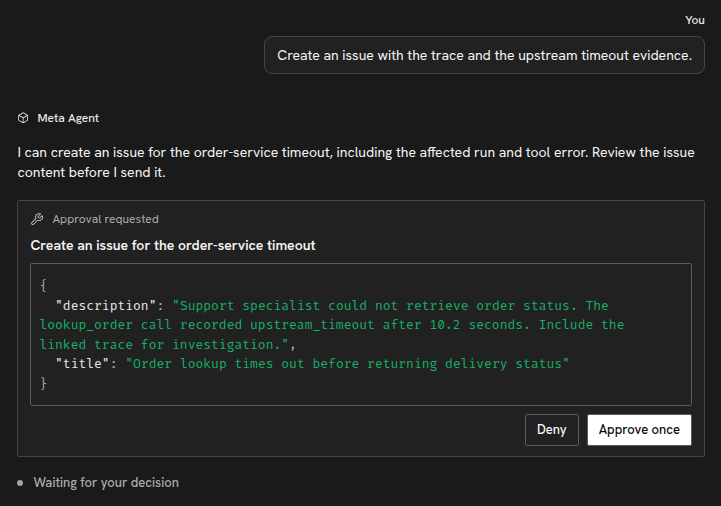
Each participant’s turns use their own connections and permissions. Sharing a conversation does not let another participant approve your requests. The same rule applies to Slack conversations.
Reconnect or remove a connection
Section titled “Reconnect or remove a connection”Open the connection’s management dialog to Refresh tools, Reconnect, change policies, or Disconnect server. Reconnect when authorization expires or you need a different external account. Review permissions after refreshing tools because a server can change what its tools do.
Disconnecting prevents future calls through that connection; it does not reverse completed actions.
To connect a coding assistant to Radiant, use External assistants through MCP. That connection exposes Radiant’s tools to the assistant rather than adding external tools to Meta Agent.
Copyright © 2026, Radiant AI Limited.